 EN
EN
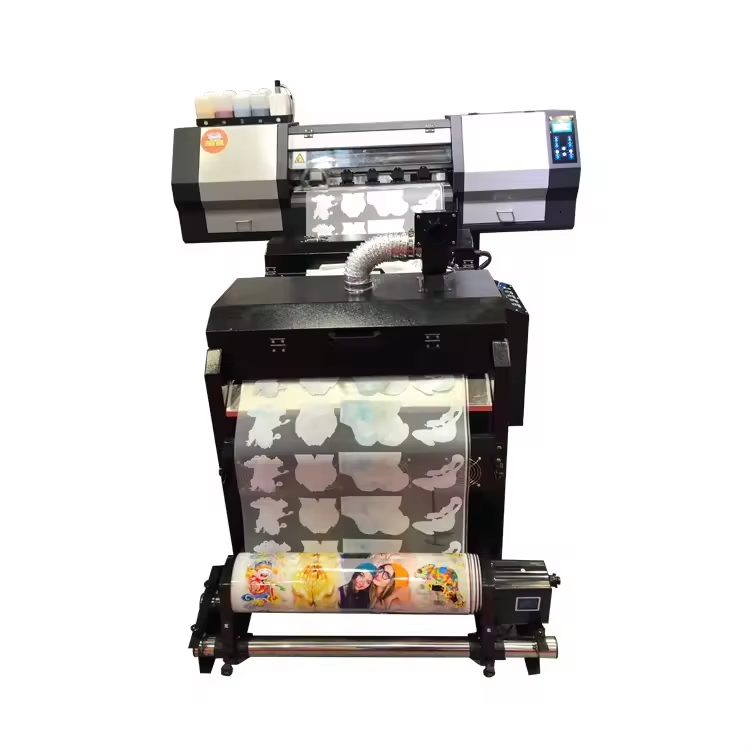
Direct-to-film (DTF) printing has revolutionized the textile decoration industry by offering a versatile method for transferring vibrant designs onto various fabric types. Understanding the key workflow for operating a DTF printer is essential for businesses seeking to implement this technology effectively. The DTF printer workflow encompasses several critical stages that require precise coordination between equipment preparation, material handling, printing processes, and post-processing techniques to achieve professional-quality results.
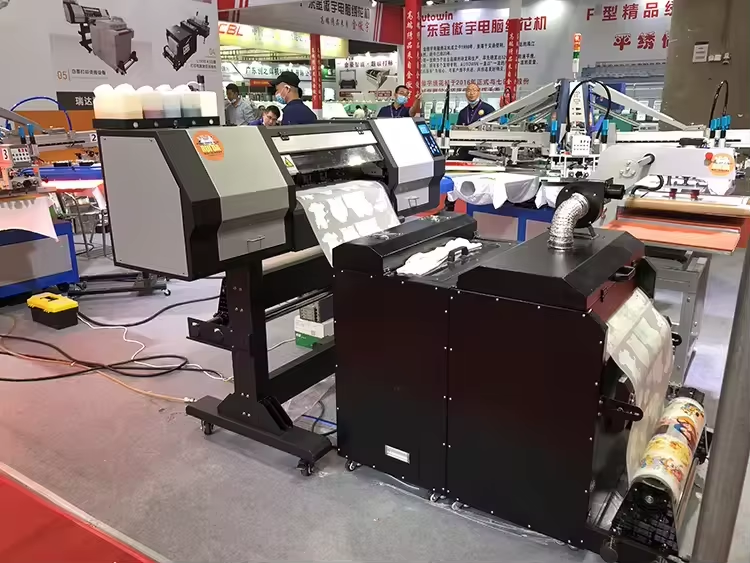
The operational workflow of a DTF printer differs significantly from traditional direct-to-garment printing methods, requiring operators to master a sequential process that begins with design preparation and concludes with heat transfer application. Each step in the DTF printer workflow must be executed with attention to detail to ensure optimal ink adhesion, color vibrancy, and transfer durability. This comprehensive workflow approach enables operators to maximize their DTF printer investment while maintaining consistent output quality across various production volumes.
Pre-Printing Setup and Material Preparation
DTF Printer Initialization and Calibration
Before beginning any DTF printer workflow, operators must perform essential initialization procedures to ensure optimal printing conditions. The DTF printer requires proper warm-up time to reach operating temperature, typically taking 10-15 minutes depending on the model and ambient conditions. During this period, operators should verify that all ink cartridges contain sufficient levels of CMYK colors plus white ink, as DTF printing relies heavily on white ink as a base layer for vibrant color reproduction.
Print head alignment represents a critical aspect of DTF printer preparation that directly impacts output quality. Operators should run automated alignment procedures through the printer software interface, checking for any nozzle blockages or inconsistencies in ink flow. Regular maintenance of the DTF printer includes cleaning cycles that prevent ink buildup and ensure consistent droplet formation across all nozzles.
Temperature and humidity control within the printing environment significantly affects DTF printer performance. Optimal conditions typically range between 65-75°F with humidity levels maintained at 45-55% to prevent film curling and ensure proper ink curing. Environmental monitoring becomes particularly important when operating multiple DTF printer units simultaneously in production environments.
DTF Film and Powder Preparation
DTF film selection and preparation form the foundation of successful transfer production using any dtf printer. The workflow requires loading appropriately sized DTF films that match the intended design dimensions while allowing adequate margins for handling and trimming. Film quality directly impacts final transfer results, making it essential to use films specifically formulated for DTF printing applications rather than generic polyethylene terephthalate materials.
Hot melt adhesive powder preparation involves ensuring consistent particle size distribution and proper storage conditions to maintain powder flowability. Operators must verify that powder application equipment functions correctly and that powder coverage remains uniform across the designated application area. The DTF printer workflow requires coordination between printing speed and powder application timing to achieve optimal adhesion characteristics.
Media handling procedures within the DTF printer workflow include proper film loading techniques that prevent creasing or contamination during the printing process. Operators should maintain clean handling surfaces and use appropriate tools to position films accurately within the printer feed mechanism. Static electricity control becomes important when working with DTF films, particularly in low-humidity environments where static buildup can affect print quality.
Design Processing and Print Execution
RIP Software Configuration and Color Management
The DTF printer workflow relies heavily on sophisticated RIP (Raster Image Processor) software that converts design files into printer-readable instructions while managing color profiles and ink distribution patterns. Operators must configure RIP settings to match specific DTF film characteristics, including ink density limits, white ink underbase requirements, and color saturation adjustments. These settings ensure that the DTF printer produces colors that match design specifications while preventing ink oversaturation that could affect transfer quality.
Color profile management within the DTF printer workflow involves calibrating output to match expected color standards using standardized color charts and spectrophotometer measurements. Regular color calibration ensures consistent results across different design projects and helps maintain brand color accuracy for commercial applications. The RIP software must be configured to handle the unique requirements of DTF printing, including white ink opacity settings and color layering sequences.
Print queue management becomes crucial when operating a DTF printer in production environments where multiple designs require processing simultaneously. The workflow should include systematic organization of print jobs based on design complexity, color requirements, and production deadlines. Efficient queue management maximizes DTF printer utilization while minimizing material waste and production delays.
Printing Process Execution and Quality Control
The actual printing phase of the DTF printer workflow begins with loading the prepared design file and initiating the print sequence through the RIP software interface. Operators must monitor the DTF printer throughout the printing process to identify potential issues such as ink flow irregularities, film feeding problems, or color inconsistencies that could compromise transfer quality. Real-time monitoring allows for immediate intervention when problems arise, preventing waste of expensive DTF materials.
White ink application represents a unique aspect of DTF printer operation that requires special attention within the workflow. The white ink layer serves as an opacity foundation that enables vibrant color reproduction on dark fabrics, making proper white ink coverage essential for professional results. Operators must ensure that white ink density meets design requirements while avoiding excessive application that could create thickness variations or affect transfer flexibility.
Print speed optimization within the DTF printer workflow involves balancing production efficiency with output quality requirements. Higher print speeds may reduce per-unit production costs but could compromise color accuracy or detail resolution in complex designs. Operators must establish appropriate speed settings based on design complexity, quality standards, and production volume requirements to maximize overall workflow efficiency.
Post-Printing Processing and Quality Assurance
Powder Application and Curing Procedures
Immediately following the printing phase, the DTF printer workflow transitions to powder application procedures that create the adhesive layer necessary for heat transfer functionality. Operators must apply hot melt powder uniformly across the entire printed design while the ink remains wet, ensuring complete coverage without excess powder accumulation that could affect transfer appearance. The timing of powder application is critical, as delayed application may result in poor adhesion between the powder and printed ink layers.
Powder curing represents a crucial step in the DTF printer workflow that transforms the applied powder into a functional adhesive layer through controlled heat application. Most DTF printer operations utilize conveyor ovens or heat tunnels that maintain specific temperature profiles designed to melt and bond the powder without damaging the printed design or DTF film substrate. Proper curing ensures strong adhesion properties while maintaining transfer flexibility required for fabric applications.
Quality inspection during the post-printing phase involves examining completed transfers for powder coverage uniformity, proper curing indicators, and overall design integrity. Operators should check for areas of insufficient powder application, incomplete curing, or contamination that could affect transfer performance. The DTF printer workflow should include documentation procedures for tracking quality metrics and identifying trends that may indicate equipment or process adjustments needed.
Trimming, Storage, and Transfer Preparation
Design trimming within the DTF printer workflow involves carefully cutting finished transfers to final dimensions while maintaining adequate borders for handling during heat press application. Automated cutting systems can improve efficiency and consistency, but manual trimming may be necessary for complex shapes or small production runs. Proper trimming techniques prevent delamination of the powder layer and ensure clean edges that produce professional-looking final transfers.
Storage protocols for completed DTF transfers require consideration of environmental factors that could affect adhesive properties or film integrity over time. The DTF printer workflow should include procedures for protecting finished transfers from moisture, excessive heat, and physical damage during storage periods. Proper storage extends the usable life of DTF transfers and maintains consistent performance when applied to garments weeks or months after production.
Heat press preparation procedures conclude the DTF printer workflow by ensuring that transfer application equipment operates at appropriate temperature and pressure settings for specific fabric types and transfer sizes. Operators must verify that heat press platens maintain uniform temperature distribution and that pressure settings provide adequate contact force without damaging transfer or garment materials. Proper heat press setup is essential for achieving strong, durable bonds between DTF transfers and textile substrates.
Workflow Optimization and Maintenance Integration
Production Efficiency Enhancement Strategies
Optimizing the DTF printer workflow involves implementing systematic approaches that reduce production time while maintaining or improving output quality. Batch processing strategies allow operators to group similar designs or color profiles, minimizing setup changes and maximizing DTF printer utilization. Efficient workflow design considers material handling logistics, workspace organization, and operator movement patterns to eliminate unnecessary steps and reduce production bottlenecks.
Inventory management within the DTF printer workflow ensures that essential consumables including inks, films, and powders remain available for uninterrupted production. Automated inventory tracking systems can monitor consumption rates and trigger reorder procedures before shortages occur. Strategic inventory management reduces downtime associated with material shortages while minimizing carrying costs for excess supplies.
Workflow documentation and standardization enable consistent results across multiple operators and production shifts. Standard operating procedures should detail each step of the DTF printer workflow, including setup parameters, quality standards, and troubleshooting procedures. Comprehensive documentation facilitates training new operators and ensures that workflow improvements are implemented consistently across the entire production operation.
Preventive Maintenance Integration
Integrating preventive maintenance procedures into the DTF printer workflow helps maximize equipment reliability while minimizing unexpected downtime. Daily maintenance tasks include print head cleaning cycles, ink level monitoring, and general equipment inspection for signs of wear or malfunction. Regular maintenance scheduling ensures that DTF printer components operate within specification while extending overall equipment life.
Long-term maintenance planning within the DTF printer workflow involves tracking component wear patterns and scheduling replacement of consumable parts before failure occurs. Print head replacement, cleaning station maintenance, and calibration verification should be performed according to manufacturer recommendations or based on production volume metrics. Proactive maintenance prevents production disruptions and maintains consistent output quality throughout the equipment lifecycle.
Performance monitoring systems integrated into the DTF printer workflow provide valuable data for optimizing production efficiency and identifying potential improvement opportunities. Metrics such as print speed, ink consumption rates, and quality rejection percentages help operators fine-tune workflow parameters and identify training needs. Data-driven workflow optimization ensures continuous improvement and maximum return on DTF printer investment.
FAQ
How long does the complete DTF printer workflow take from start to finish?
The complete DTF printer workflow typically requires 15-30 minutes from initial setup to finished transfer, depending on design complexity and size. Simple single-color designs may complete faster, while complex multi-color designs with detailed graphics require additional processing time. Production efficiency improves with batch processing of multiple designs simultaneously.
What are the most critical quality control points in the DTF printer workflow?
Critical quality control points include print head alignment verification, white ink coverage inspection, powder application uniformity, and proper curing temperature monitoring. Color accuracy checks during design processing and final transfer inspection before storage ensure consistent quality throughout the DTF printer workflow. Regular calibration maintains quality standards over time.
Can the DTF printer workflow be automated to reduce labor requirements?
Several aspects of the DTF printer workflow can be automated, including powder application systems, conveyor curing ovens, and automated cutting equipment. However, design preparation, quality inspection, and equipment maintenance still require operator oversight. Semi-automated systems provide the best balance between efficiency and quality control for most production environments.
What troubleshooting steps should be included in the DTF printer workflow?
Essential troubleshooting procedures include nozzle cleaning protocols for print quality issues, film feeding adjustments for media handling problems, and temperature calibration for curing inconsistencies. The DTF printer workflow should include systematic diagnostic steps and corrective actions for common problems. Regular operator training on troubleshooting procedures minimizes production delays when issues arise.
Table of Contents
- Pre-Printing Setup and Material Preparation
- Design Processing and Print Execution
- Post-Printing Processing and Quality Assurance
- Workflow Optimization and Maintenance Integration
-
FAQ
- How long does the complete DTF printer workflow take from start to finish?
- What are the most critical quality control points in the DTF printer workflow?
- Can the DTF printer workflow be automated to reduce labor requirements?
- What troubleshooting steps should be included in the DTF printer workflow?