 EN
EN
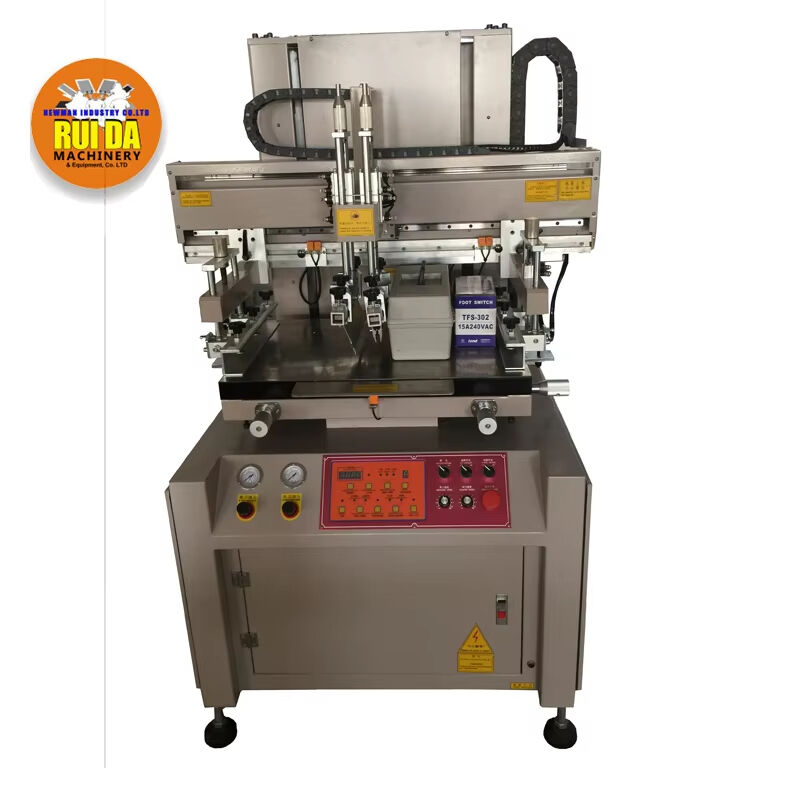
Maintaining your printing machine screen is crucial for achieving consistent, high-quality prints and extending the lifespan of your equipment. A well-maintained printing machine screen delivers sharp images, vibrant colors, and professional results across thousands of print runs. Whether you're operating a manual single-color setup or an advanced multi-station system, proper screen care directly impacts your production efficiency and print quality. Understanding the fundamentals of screen maintenance helps prevent costly replacements and ensures your printing operation runs smoothly throughout demanding production schedules.
Understanding Screen Printing Components and Materials
Mesh Construction and Fabric Types
The printing machine screen consists of several critical components that work together to transfer ink onto substrates. The mesh fabric forms the foundation of every screen, typically constructed from polyester or nylon threads woven in precise patterns. Polyester meshes offer superior durability and dimensional stability, making them ideal for high-volume commercial applications. The mesh count determines the fineness of detail your printing machine screen can reproduce, with higher counts enabling finer detail reproduction but requiring more careful handling during cleaning procedures.
Modern printing machine screen construction incorporates advanced synthetic materials that resist stretching and chemical degradation. The mesh tension must remain consistent across the entire frame to ensure uniform ink deposit and prevent registration issues. Professional screen manufacturers calibrate tension levels according to specific printing applications, considering factors like ink viscosity, substrate type, and press speed requirements.
Frame Materials and Durability Factors
Screen frames provide structural support for the mesh and maintain proper tension throughout the printing process. Aluminum frames offer excellent strength-to-weight ratios and resist corrosion from cleaning solvents and water-based inks. Steel frames provide maximum rigidity for large-format screens but require protective coatings to prevent rust formation. The frame construction directly influences how your printing machine screen responds to cleaning procedures and chemical exposure.
Professional-grade frames feature precision-machined surfaces that ensure perfect mesh contact and eliminate air gaps that could affect print quality. Frame depth affects ink volume capacity and influences squeegee blade contact with the mesh surface. Understanding these structural elements helps operators select appropriate cleaning methods that preserve frame integrity while maintaining optimal printing conditions.
Essential Cleaning Tools and Chemical Solutions
Solvent Selection for Different Ink Types
Proper solvent selection is fundamental to effective printing machine screen maintenance without damaging mesh or frame components. Water-based inks typically respond well to enzyme-based cleaners that break down pigment particles and binding agents. Plastisol inks require mineral spirits or specialized plastisol removers that dissolve the polymer base without attacking the screen mesh. UV-curable inks present unique challenges, often requiring alkaline cleaners or specialized UV ink removers.
Industrial cleaning operations benefit from multi-stage solvent systems that address different contamination types. Pre-cleaning with mild detergents removes water-soluble residues, while stronger solvents tackle stubborn ink deposits and adhesive residues. The printing machine screen material compatibility must be verified before applying any cleaning solution to prevent mesh degradation or frame damage.
Mechanical Cleaning Equipment and Techniques
Professional screen cleaning stations incorporate pressure washing systems, ultrasonic baths, and automated scrubbing mechanisms that ensure thorough contamination removal. High-pressure water systems effectively remove ink residues from printing machine screen surfaces while minimizing manual labor requirements. Ultrasonic cleaning provides deep penetration into mesh openings, removing microscopic particles that conventional washing cannot address.
Brush selection plays a critical role in mechanical cleaning effectiveness without damaging delicate mesh structures. Natural bristle brushes work well with water-based systems, while synthetic brushes resist chemical degradation from harsh solvents. Rotating brush systems provide consistent cleaning pressure across the entire printing machine screen surface, ensuring uniform contamination removal and preventing localized mesh damage.
Step-by-Step Screen Cleaning Procedures
Pre-Cleaning Assessment and Preparation
Before beginning any cleaning procedure, thoroughly assess your printing machine screen condition to identify specific contamination types and determine appropriate cleaning strategies. Document ink types, exposure times, and any visible damage that might affect cleaning procedures. Remove excess ink using plastic squeegees or spatulas to minimize chemical waste and reduce cleaning time requirements.
Proper workspace preparation ensures safe and effective cleaning operations while protecting surrounding equipment from chemical exposure. Establish adequate ventilation systems to remove solvent vapors and maintain worker safety standards. Organize cleaning materials, tools, and protective equipment within easy reach to maintain efficient workflow throughout the cleaning process.
Chemical Application and Agitation Methods
Apply cleaning solutions evenly across both sides of the printing machine screen using spray bottles or foam applicators for consistent coverage. Allow appropriate dwell time for chemical penetration, typically ranging from two to ten minutes depending on contamination severity and ink type. Gentle agitation using soft brushes or sponges helps break down stubborn residues without damaging mesh fibers.
Temperature considerations significantly impact cleaning effectiveness, with warm solutions often providing superior results compared to cold applications. Monitor solution temperatures to prevent excessive heat that could damage synthetic mesh materials or cause rapid solvent evaporation. The printing machine screen requires careful handling during chemical treatment to preserve mesh integrity and frame alignment.
Preventive Maintenance Strategies
Regular Inspection and Documentation
Implementing systematic inspection schedules helps identify potential problems before they impact production quality or require expensive screen replacement. Weekly visual inspections should examine mesh tension, frame condition, and any signs of chemical damage or physical wear. Document findings in maintenance logs that track screen performance trends and identify patterns requiring attention.
Professional printing operations benefit from tension measurement tools that quantify mesh conditions and predict replacement needs. Digital tension meters provide objective measurements that eliminate guesswork from maintenance decisions. Regular measurements help establish baseline values for each printing machine screen and track degradation rates over time.
Storage and Handling Best Practices
Proper storage techniques significantly extend printing machine screen lifespan while maintaining print quality standards. Vertical storage racks prevent frame warping and protect mesh surfaces from physical damage. Climate-controlled storage areas minimize temperature and humidity fluctuations that could affect mesh tension and frame stability.
Handling procedures should emphasize gentle treatment and proper support techniques that distribute weight evenly across frame structures. Training programs ensure all operators understand correct lifting techniques and storage protocols. Protective covers shield screens from dust accumulation and accidental damage during storage periods.
Troubleshooting Common Screen Problems
Mesh Damage and Repair Options
Identifying mesh damage early prevents minor problems from escalating into complete screen failure. Small holes or tears may be repairable using specialized mesh repair tapes or liquid patching compounds designed for printing machine screen applications. However, extensive damage typically requires complete re-screening to maintain print quality standards.
Mesh stretching indicates loss of proper tension that affects ink deposit consistency and print registration accuracy. Professional re-tensioning services can restore optimal conditions in many cases, though severely degraded mesh may require complete replacement. Understanding tension loss patterns helps operators adjust maintenance schedules and prevent premature screen failure.
Chemical Staining and Contamination Issues
Chemical staining from improper cleaning procedures or incompatible solvents can permanently damage printing machine screen materials. Prevention strategies focus on proper solvent selection, adequate rinsing procedures, and immediate treatment of accidental chemical exposure. Stained screens may still function adequately if mesh integrity remains intact.
Contamination from foreign materials like adhesive residues, tape remnants, or environmental debris requires specialized removal techniques. Identify contamination sources to prevent recurring problems and implement protective measures during screen handling and storage. Some contamination types may require professional cleaning services to avoid further damage.
Advanced Maintenance Techniques for Production Environments
Automated Cleaning Systems Integration
High-volume production facilities often benefit from automated screen cleaning systems that ensure consistent results while reducing labor costs. These systems incorporate programmable wash cycles, chemical dispensing controls, and quality monitoring features that optimize cleaning effectiveness. Automated systems maintain detailed records of cleaning parameters and screen performance metrics.
Integration with production management systems enables predictive maintenance scheduling based on actual screen usage data rather than arbitrary time intervals. Smart monitoring systems track print counts, ink consumption, and cleaning frequency to optimize maintenance intervals. This data-driven approach maximizes printing machine screen lifespan while minimizing unexpected downtime.
Quality Control and Performance Monitoring
Professional quality control programs incorporate regular print testing to verify screen condition and identify subtle performance degradation. Test prints reveal problems like uneven ink deposit, poor detail reproduction, or color consistency issues that may not be visible during routine inspections. Standardized test patterns enable objective comparisons across different screens and time periods.
Digital imaging systems provide detailed analysis of print quality metrics that correlate with printing machine screen condition. Densitometer readings, dot gain measurements, and resolution testing quantify performance parameters that guide maintenance decisions. This technical approach ensures screens operate at peak efficiency throughout their service life.
Cost-Effective Screen Management Strategies
Inventory Management and Replacement Planning
Effective inventory management balances screen availability with storage costs and depreciation concerns. Maintaining appropriate spare screen inventories prevents production delays while minimizing capital investment in idle equipment. Rotation schedules ensure even usage across screen inventories and prevent premature aging from extended storage.
Replacement planning considers both immediate needs and long-term production forecasts to optimize screen procurement timing. Bulk purchasing agreements often provide cost advantages while ensuring consistent screen quality and specifications. Strategic planning helps operations manager balance cost control with production reliability requirements.
Training and Skill Development Programs
Comprehensive training programs ensure all operators understand proper printing machine screen handling and maintenance procedures. Regular refresher training reinforces best practices and introduces new techniques or materials that improve maintenance effectiveness. Skilled operators prevent many common problems through proper handling and early problem identification.
Documentation of standard operating procedures ensures consistent maintenance quality regardless of operator experience levels. Visual aids and step-by-step guides help new employees master complex procedures while serving as reference materials for experienced staff. Ongoing education programs keep operations teams current with evolving maintenance technologies and techniques.
FAQ
How often should I clean my printing machine screen during production?
Cleaning frequency depends on ink type, production volume, and print quality requirements. Water-based inks typically require cleaning every 100-200 prints to prevent buildup, while plastisol inks may allow longer run times before cleaning becomes necessary. Monitor print quality continuously and clean whenever you notice decreased sharpness, color consistency issues, or ink flow problems. High-volume operations often implement scheduled cleaning breaks every 2-4 hours regardless of print count to maintain consistent quality.
What cleaning chemicals should I avoid when maintaining screen printing equipment?
Avoid harsh acids, strong alkalis, and chlorinated solvents that can damage mesh fibers or frame materials. Acetone and other ketone-based solvents may dissolve certain mesh materials and should be used cautiously. Never use abrasive compounds or steel wool that can physically damage delicate mesh structures. Always test new cleaning products on a small, inconspicuous area before applying to the entire printing machine screen surface to prevent unexpected damage.
Can I repair small holes in my printing machine screen mesh?
Small pinholes and minor tears can often be repaired using specialized screen repair products like mesh adhesive patches or liquid mesh repair compounds. These repairs work best for holes smaller than 2-3mm and in non-critical print areas. However, repairs may affect ink flow characteristics and print quality, so consider the location and size of damage relative to your quality requirements. Extensive damage or holes in detailed image areas typically require complete screen replacement for professional results.
How do I know when my printing machine screen needs replacement rather than cleaning?
Replace screens when mesh tension falls below acceptable levels, when extensive physical damage is present, or when chemical staining significantly affects print quality. Signs requiring replacement include sagging mesh, frame damage, multiple repairs in the image area, or persistent print quality problems despite thorough cleaning. Professional tension measurements below 15-20 Newtons typically indicate replacement needs. Additionally, if cleaning costs exceed 30-40% of replacement costs, consider purchasing new screens for better cost efficiency.
Table of Contents
- Understanding Screen Printing Components and Materials
- Essential Cleaning Tools and Chemical Solutions
- Step-by-Step Screen Cleaning Procedures
- Preventive Maintenance Strategies
- Troubleshooting Common Screen Problems
- Advanced Maintenance Techniques for Production Environments
- Cost-Effective Screen Management Strategies
-
FAQ
- How often should I clean my printing machine screen during production?
- What cleaning chemicals should I avoid when maintaining screen printing equipment?
- Can I repair small holes in my printing machine screen mesh?
- How do I know when my printing machine screen needs replacement rather than cleaning?